ClickFix: The CAPTCHA That Asks You to Press Windows + R
A website tells you that you failed a human verification check, then hands you three keystrokes to fix it. They open the Run dialog and run a command the page had already placed on your clipboard.
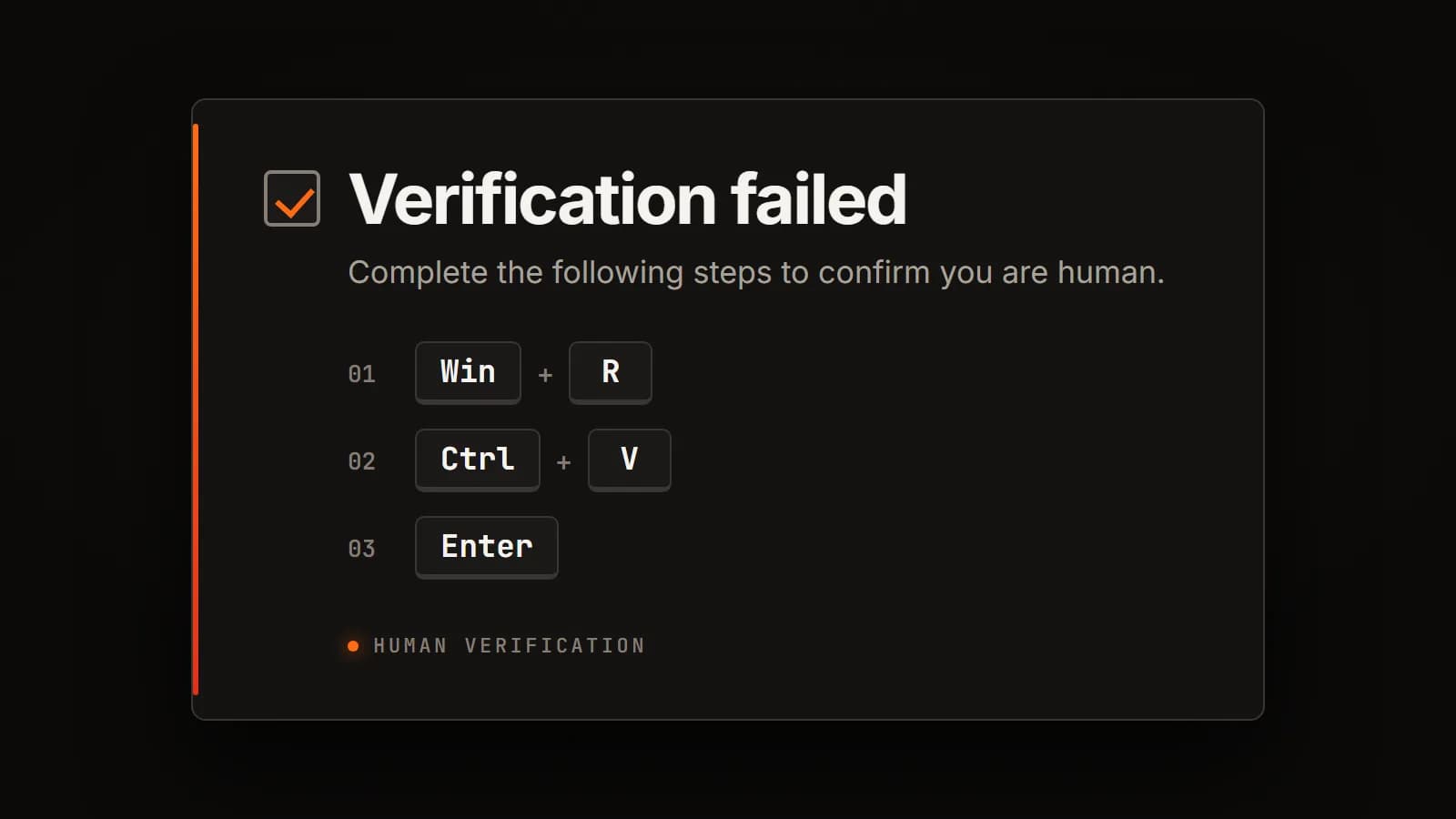
Every security control between a website and code running on your machine assumes the website is the one trying to run the code. Downloads get scanned. Executables get flagged. Scripts from the internet get blocked. Macros throw a warning bar.
This attack skips all of it by asking the user to run the command themselves.
It has been spreading steadily, it works on fully patched machines, and it does not care which browser you use. The industry has settled on calling it ClickFix. I have watched it go from a curiosity to something I now expect to see.
What it looks like
Someone visits a website. Sometimes it is a malicious site reached through a poisoned search result or an ad, but often it is an ordinary legitimate site that has been compromised and had a script injected into it.
The page shows a verification widget. It is styled to look like the Cloudflare or reCAPTCHA checks that everyone has been trained to click through without thinking. The user clicks the checkbox, and the widget reports that verification failed and offers a manual alternative:
Verification failed. To confirm you are human, complete these steps:
- Press Windows + R
- Press Ctrl + V
- Press Enter
Nothing about that sequence looks like an attack to someone who is not technical. It looks like a workaround for a broken widget, which is a completely ordinary experience on the modern web.
What actually happens is this. When the user clicked the checkbox, JavaScript on the page silently wrote a command to their clipboard. Windows + R opens the Run dialog. Ctrl + V pastes the attacker's command into it. Enter executes it.
The command is usually a single line that fetches a script from a remote server and runs it in memory. Attackers typically pad the visible part with a long run of spaces followed by a decoy comment, so a user who glances at the Run box before pressing Enter sees something reassuring like a checkmark and the words "I am not a robot" rather than the command hiding off to the left.
From there it is an ordinary infection. Most commonly an information stealer that takes browser cookies, saved passwords and active session tokens, frequently followed by a remote access tool that gives the operator a persistent foothold.
Why it defeats people who know better
The reason this works is not that users are careless. It is that the attack sits in a gap that awareness training does not cover.
Think about what people have actually been taught. Do not open unexpected attachments. Do not click links in suspicious emails. Check the sender address. Look for the padlock. Every one of those rules is about evaluating something before you interact with it.
This attack does not ask for any of that. There is no attachment, no link to inspect, no sender to verify. The user has already decided the site is fine, because they went there deliberately or arrived from a normal search result. The request comes after trust is established, and it is framed as a technical fix rather than a request for anything.
Three other things make it effective:
CAPTCHAs have trained everyone to comply. A decade of proving humanity to computers has taught people that arbitrary, slightly annoying instructions from a verification box are normal, and that the correct response is to do what it says so you can get on with your day.
It borrows credibility. The widget imitates security infrastructure specifically. Users associate Cloudflare's branding with protection, so the thing asking them to run a command looks like the thing protecting them from things that ask them to run commands.
The clipboard is invisible. Nobody checks what is on their clipboard before pasting. There is no reason to. Ctrl + V is one of the most automatic actions in computing, and this attack turns that into the payload delivery step.
The result is a technique that requires no vulnerability, works identically on Chrome, Edge and Firefox, and survives every patch cycle, because there is nothing to patch. The exploited component is the person.
The one rule to give users
Most security advice fails because it asks people to make judgment calls. This one does not need to.
No legitimate website ever needs you to press keys outside the browser window.
That is the whole rule, and it is worth stating exactly that plainly. Not "be careful with CAPTCHAs" and not "watch out for suspicious sites." A real verification check happens entirely inside the page. If a website gives you keyboard instructions that involve the Windows key, the Run dialog, or a terminal, the correct response is to close the tab, regardless of how broken the page appears or how legitimate the site is.
It is a rule with no exceptions to remember and no severity to assess, which is why it is the one piece of user education here that will actually stick.
Detection
Everything below is for the people running the environment rather than working in it.
The good news is that this technique leaves an unusually clean artifact, because Windows records what gets typed into the Run dialog.
RunMRU
The Run dialog writes its history to the user's registry hive, most recent first:
Get-ItemProperty 'HKCU:\Software\Microsoft\Windows\CurrentVersion\Explorer\RunMRU'Every entry a user has run is there, in order, and it persists across reboots. On a machine you suspect, this is the first place to look, and it will frequently contain the full command including the padding and the decoy comment. It is also worth collecting proactively, because it answers the question a user usually cannot: what exactly did you paste.
Two caveats. It is per-user, so check the hive of the account that was logged on rather than whoever is logged on when you arrive. And it is trivially clearable, so its absence proves nothing.
Process lineage
When a command runs from the Run dialog, its parent process is explorer.exe. For most users in most environments, explorer.exe spawning a script interpreter is not normal behavior:
DeviceProcessEvents
| where InitiatingProcessFileName =~ "explorer.exe"
| where FileName in~ ("powershell.exe", "pwsh.exe", "mshta.exe", "cmd.exe",
                      "wscript.exe", "cscript.exe", "curl.exe")
| project Timestamp, DeviceName, AccountName, FileName, ProcessCommandLine
Expect some noise from technical staff who legitimately use the Run box. That noise is worth tuning rather than suppressing, because for a standard office user this signal is close to clean.
Script block logging
If PowerShell script block logging is not enabled, turn it on. It records the actual script content after deobfuscation, which matters here because the pasted command is usually a small loader whose real payload only exists in memory. Without it, you get a command line full of encoded text and no idea what ran.
It is Event ID 4104 in Microsoft-Windows-PowerShell/Operational, and it is a group policy setting under Administrative Templates, Windows Components, Windows PowerShell.
Hardening
Ordered by how much they actually help.
Block the Run dialog for users who do not need it. User Configuration, Administrative Templates, Start Menu and Taskbar, "Remove Run menu from Start Menu." This disables Windows + R as well as the Start menu entry, and it removes the specific mechanism this technique depends on. For a standard office user, the Run box has no daily purpose. Scope it to a group that excludes IT.
This is the single most effective control here, and it is the one people skip because it feels heavy-handed. It is worth reconsidering in that light.
Constrain the script interpreters. AppLocker or WDAC restricting PowerShell, mshta.exe and wscript.exe to approved paths and signed scripts is the control that survives the attacker switching techniques. Blocking the Run box stops this specific delivery method; constraining interpreters stops the class.
Enable PowerShell Constrained Language Mode for standard users where your tooling allows it. It sharply limits what a pasted one-liner can do.
Enable script block and module logging, per the detection section. This is visibility rather than prevention, but it is the difference between knowing what happened and guessing.
Attack surface reduction rules are worth having, but be honest about where they fit. They act on the payload after execution has already started, not on the paste itself. The obfuscated-script rule is the relevant one, and it is a backstop rather than a defense.
What does not help, and why it matters
This is the part worth internalizing, because several of the controls people reach for first do nothing against this technique.
Control | Why it does not stop this |
|---|---|
Email security | The attack does not arrive by email. It arrives through search results, ads, and compromised legitimate sites. |
Web filtering by reputation | The hosting site is frequently a legitimate one that has been compromised. Its reputation is genuinely good. |
"Do not click suspicious links" training | Nothing suspicious was clicked. The user went somewhere ordinary and followed on-page instructions. |
Removing local administrator rights | Important for many reasons, but not this one. Infostealers take browser cookies, saved credentials and session tokens, all of which live in the user's own profile and are readable without elevation. |
Antivirus alone | The pasted command is usually a small loader that pulls its real payload into memory at runtime. There is often no file on disk to scan. |
The local admin point is the one that surprises people. Removing admin rights is genuinely one of the highest-value controls in a Windows environment, and it is easy to assume it covers this. It does not. Session token theft in particular hands an attacker authenticated access to cloud services without needing a password, an MFA prompt, or any privilege on the endpoint at all.
The part that should worry you
What makes this technique durable is that it does not exploit software. There is no CVE, no patch, and no vendor fix coming. It exploits an instruction-following reflex that we spent fifteen years deliberately training into users, and it will keep working for exactly as long as that reflex exists.
The lures will change. I have already seen the same clipboard-and-Run-dialog mechanism dressed as a document viewer error, a video codec prompt, and a Windows update notice. The CAPTCHA framing is currently the most common, but it is the delivery step that matters, not the costume it arrives in.
Which is why the user-facing rule is worded the way it is. Teaching people to distrust fake CAPTCHAs solves this month's version. Teaching them that no website ever needs their keyboard outside the browser solves the technique.